
Authentication and Authorization#
Authentication#
The Authentication module works with a third-party authentication service. The Autosubmit API implements 2 types of authentication services: CAS and OAuth2 with GitHub. For Authorization, the API uses GitHub Organization and Teams to whitelist users only when GitHub auth is enabled.
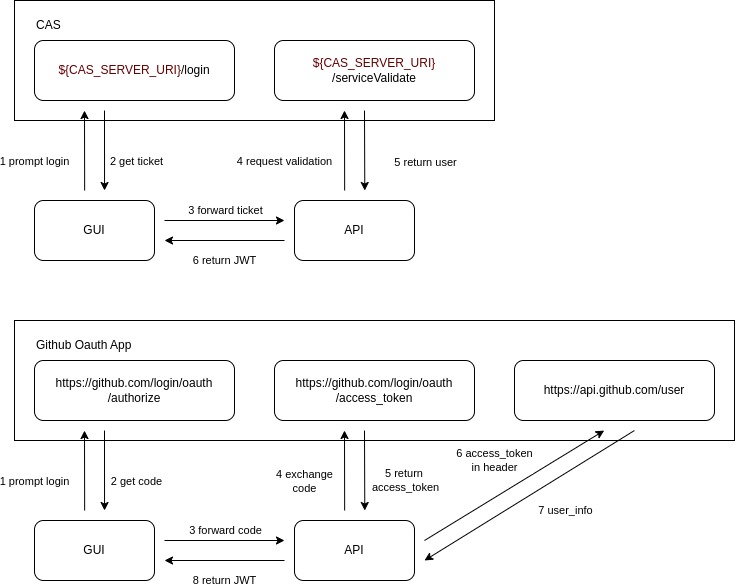
Authentication processes#
The API offers these endpoints to authenticate users:
CAS Login:
GET /v4/auth/cas/v2/loginGithub Oauth2 Login:
GET /v4/auth/oauth2/github/loginVerify JWT token (generated from any of the previous endpoints):
GET /v4/auth/verify-token
The Login endpoints will generate a JWT token with its Bearer prefix (version >= 4.0.1b4) that will be used to authenticate the user in the API. This tokens will last 5 days.
Important
You must to set up the environment variable SECRET_KEY in production environments to generate the custom token securely.
CAS#
Regarding the API, the key points to enable CAS are:
You need to set up the environment variables with prefix
CAS_as it is explained in Configuration which identifies the third-party authentication service.You need to add your authorized (allowed to be authenticated) URLs to the
.autosubmitrcconfiguration underIn the example below,
https://myhost.com/has been previously authorized to request authentication from CAS; and, by this setting, it is also authorized to be part of the authentication process at theAPIlevel.[clients] authorized = https://myhost.com/
GitHub Oauth App#
To se tup the GitHub OAuth App authentication, you need to:
Create a GitHub OAuth App in your GitHub account.
Set up the environment variables with prefix
GITHUB_OAUTH_CLIENT_as it is explained in Configuration which identifies the third-party authentication service.In case of whitelist users, you need to set up the environment variable
GITHUB_OAUTH_WHITELIST_ORGANIZATIONorGITHUB_OAUTH_WHITELIST_TEAMwith the name of the organization/team in GitHub.
OpenID Connect#
To set up the OpenID Connect authentication, you need to set up the environment variables with prefix OIDC_ as it is explained in Configuration which identifies the third-party authentication service.
Basically, the API will request a token to the OpenID Connect server and will use it to authenticate the user in the API. For that, the environment variable OIDC_TOKEN_URL, OIDC_CLIENT_ID, and OIDC_CLIENT_SECRET are required.
Then, the API will retrieve the username depending on the value of the environment variable OIDC_USERNAME_SOURCE. If it is set to userinfo, the API will request the username to the OpenID Connect server. If it is set to id_token, the API will use the content of the token to get the username. In both cases, the claim to use as username is set in the environment variable OIDC_USERNAME_CLAIM.